

If you need to speak with an advisor about a petition, please find instructions here. Do not schedule through Navigate.
Schedule an Appointment
When?
- You can schedule an appointment up to three weeks in advance in Navigate, instructions below.
- We recommend scheduling your appointment early in the term.
- Appointments are significantly reduced during week 1, 8, and 9 because advisors shift over to drop-in to accommodate urgent scheduling questions.
- If you don’t see an appointment available, don’t worry, come to drop-in.
How?
- Schedule through Navigate.
- Chat the front desk on Microsoft Teams.
- Come in-person to the front desk, located on the first floor of Tykeson Hall.
- Call (541) 346-9200 to speak with CAS Advising reception, 9am-4pm. Phone hours are limited during weeks 1, 8, 9, and breaks. Leave a voicemail or message the front desk on Teams.
Navigate Scheduling Instructions:
2
Click on “Schedule Appointment”
Depending on the device you are using, the “Schedule Appointment” link may be at the bottom of the page.
3
Choose “College of Arts & Sciences (CAS) Advising”
4
Select the appropriate appointment topic
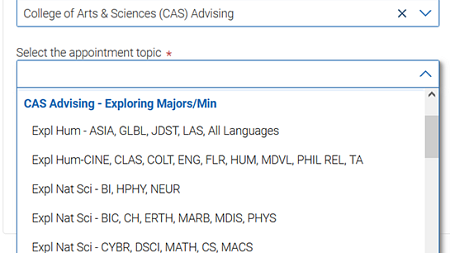
- To schedule with your major advisor, select your CAS major at the top of the list.
- Major not listed or recently declared? Follow the “exploring” instructions below.
- CAS minor questions? Choose either Humanities, Social Science, or Natural Science minor advising.
- If you are uncertain which category to choose, please review the advising structure here. Psychology and Environmental Studies and Sciences are considered Social Sciences.
- To explore a new CAS major or minor, choose from the following areas under the blue “CAS Advising – Exploring Majors/Min” option within the dropdown menu.”
Need help understanding acronyms?- Expl Hum - ASIA, GLBL, JDST, LAS, All Languages
- Expl Hum - CINE, CLAS, COLT, ENG, FLR, HUM, MDVL, PHIL REL, TA
- Expl Nat Sci - BI, HPHY, NEUR Expl Nat Sci - BIC, CH, ERTH, MARB, MSCI, MTSC, PHYS
- Expl Nat Sci - CYBR, DSCI, MATH, CS, MACS
- Expl Soc Sci - ANTH, ENVS, GEOG, LING, PSY, SDST
- Expl Soc Sci - EC, GSS, HIST, IRES, NAIS, PS, SOC, WGSS
Need to speak with a Pre-Health Advisor? Learn more about appointment options.
5
Find a time that works with your schedule
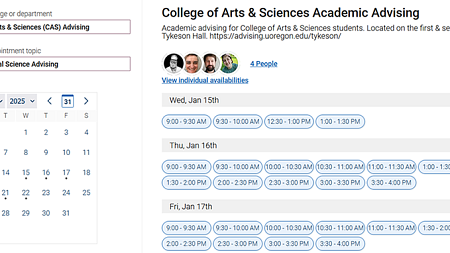
- Leave “Pick a Date” to search availability for the next three weeks. Then click the blue “Find Available Time” button to see the availability of advisors for your selected topic.
- No available appointments? Come to drop-in advising!
6
Choose how you would like to meet
You can use the lower left drop down menus to filter results by type of meeting—Teams, Zoom, in person—and by specific advisor.
7
Leave a comment for the Advisor
After selecting your time, please leave a comment to let the advisor know what you would like to cover during your appointment.
8
Click “Schedule” at the bottom of the page
Congratulations, you have scheduled your appointment with CAS Academic Advising. We look forward to seeing you soon! After scheduling, you will receive an appointment confirmation to your UO email address.